Your Auction Shouldn't Start Without a Checklist
Picture this: it’s three weeks before your silent auction and you’ve got six volunteers, a shared Google doc nobody’s updating, and a nagging feeling that someone forgot to confirm the venue tables. You’re not sure who’s ordering bid sheets, whether the donation acknowledgment letters went out, or when the item pickup window closes. Everything lives in your head — and that’s exactly where things fall apart.
A free silent auction planning checklist template gives your whole team a single, shared source of truth. Instead of chasing status updates via text message at 10pm, you have one document that tracks every task, deadline, and responsible person from the first planning meeting to the final checkout table. Nothing gets forgotten. Nobody duplicates work. And you stop being the only one who knows what’s actually going on.
This template is especially useful for first-time auction coordinators, small nonprofit staff running events with volunteer crews, and school PTO or booster club committees where no one has a dedicated events role. If you’re the person who raised their hand to run the auction, this is the first document you should open.
A free silent auction planning checklist template gives your whole team a single, shared source of truth. Instead of chasing status updates via text message at 10pm, you have one document that tracks every task, deadline, and responsible person from the first planning meeting to the final checkout table. Nothing gets forgotten. Nobody duplicates work. And you stop being the only one who knows what’s actually going on.
This template is especially useful for first-time auction coordinators, small nonprofit staff running events with volunteer crews, and school PTO or booster club committees where no one has a dedicated events role. If you’re the person who raised their hand to run the auction, this is the first document you should open.
free download
Get your auction planning checklist template
Print-ready and fully editable. Choose the format that works best for your event.
Free, no sign-up required
No personal info collected
Print as many copies as you need
Silent Auction Planning Checklist — Print Ready
PDF · Fixed layout · US Letter
- Clean, professional layout that prints perfectly at home or at a copy shop
- Ideal for posting on a shared committee bulletin board or handing out at kickoff meetings
- Fixed formatting means nothing shifts when you print multiple copies
Silent Auction Planning Checklist — Editable
Word Doc · Fully customizable
- Add your event name, date, and organization logo right inside the document
- Remove tasks that don't apply and add your own in seconds
- Share the file with co-chairs or committee members so everyone works from the same version
What a Planning Checklist Does for Your Auction Committee
A planning checklist is the operational backbone of any well-run silent auction. It takes every task required to pull off the event — from reserving the venue to printing final bid sheets — and organizes them by phase, deadline, and owner. Without one, planning happens reactively, tasks slip through the cracks, and the coordinator ends up doing double the work trying to hold everything together in their memory.
In practice, this template gives your committee a running task list that spans the full event lifecycle: the weeks leading up to the event, the day-of setup and management window, and the post-event closeout and donor follow-up phase. Each section makes it clear not just what needs to happen, but when and ideally who is responsible for it.
Nonprofits and volunteer committees rely on this kind of checklist because turnover is real — the person who ran last year’s auction might not be available this year, and a well-structured checklist means institutional knowledge doesn’t walk out the door with them. It also makes delegation easier: when a task is clearly documented, you can hand it off to a new volunteer without a 30-minute briefing.
This template works for fully in-person auctions, hybrid events with both live and online bidding components, and events that have moved entirely to a mobile bidding platform but still need the logistical coordination documented and tracked.
In practice, this template gives your committee a running task list that spans the full event lifecycle: the weeks leading up to the event, the day-of setup and management window, and the post-event closeout and donor follow-up phase. Each section makes it clear not just what needs to happen, but when and ideally who is responsible for it.
Nonprofits and volunteer committees rely on this kind of checklist because turnover is real — the person who ran last year’s auction might not be available this year, and a well-structured checklist means institutional knowledge doesn’t walk out the door with them. It also makes delegation easier: when a task is clearly documented, you can hand it off to a new volunteer without a 30-minute briefing.
This template works for fully in-person auctions, hybrid events with both live and online bidding components, and events that have moved entirely to a mobile bidding platform but still need the logistical coordination documented and tracked.
What's Inside the Silent Auction Planning Checklist Template
- Event Date & Kickoff Milestone — Anchors every task to a specific timeline. Without a clear event date written at the top, it’s impossible to work backward and assign realistic deadlines to anything below it.
- Phase Labels (Pre-Event / Day-Of / Post-Event) — Groups tasks into three distinct operational windows so committee members can focus on what’s relevant to their role right now without being overwhelmed by the full picture.
- Task Description Column — Captures each specific action in plain language — no ambiguity about what “done” looks like for each item. Clarity here prevents two volunteers from each assuming the other handled something.
- Owner / Assigned To Column — Names the specific person responsible for each task. Shared responsibility with no named owner is the same as no responsibility at all. This column eliminates that problem.
- Due Date Column — Puts a deadline next to every task, not just the event itself. A committee that only tracks the event date will always be scrambling the week before.
- Status Field (Not Started / In Progress / Complete) — Gives coordinators a fast visual scan of where things stand without needing to schedule a full team meeting for an update.
- Notes / Dependencies Column — Space to flag blockers, vendor contact names, confirmation numbers, or anything else the next person picking up this task needs to know. Particularly useful for hand-offs between volunteers.
- Vendor & Vendor Contact Section — A dedicated area to log caterers, AV companies, venue contacts, printing vendors, and any other outside parties involved in the event. Keeps everything findable in one place.
- Item Procurement Status Tracker — A summary section to confirm that donated items have been received, photographed, and assigned a starting bid before the event opens.
- Post-Event Task Block — Covers winner notification, payment collection follow-up, thank-you letter distribution, and donor acknowledgment — the tasks most often dropped because everyone’s exhausted after the event itself.
How to Use the Silent Auction Planning Checklist
Download and set your event anchor date first
Before you add a single task, fill in your event name, organization, and confirmed event date at the top of the checklist. Every deadline you assign below will be relative to this date, so getting it locked in first gives the whole document its structure. If your date isn’t confirmed yet, make confirming it the first task on the list.
Work backward from event day to build your timeline
Go through the pre-event task section and assign a due date to each item by counting backward from your event date. Venue confirmation might need to happen 60 days out; bid sheet printing might need to be done 5 days out. Working backward forces realistic scheduling and surfaces conflicts early — before they become emergencies.
Assign a named owner to every task before your first committee meeting
Bring the checklist to your kickoff meeting with tasks already listed, and use that time to put a name next to each one. Resist the urge to leave anything assigned to “the committee” or “TBD.” The meeting should end with every task claimed by a specific person who knows they own it.
Use the status column as your weekly check-in tool
Instead of running full team meetings to get status updates, share the checklist digitally (or post a printed version in a shared space) and ask each owner to update their status column before a standing weekly check-in. You’ll spend less time on updates and more time solving actual problems.
Add vendor information and dependencies as they're confirmed
Every time you confirm a vendor, add their name and contact to the vendor section immediately. Similarly, if a task can’t start until something else is finished, note that dependency in the notes column. These two habits prevent the “I thought someone else had that number” problem that surfaces at the worst possible time.
Do a full-checklist review 72 hours before the event
Set a calendar reminder for three days before your event and go line by line through the pre-event section. Anything still marked “In Progress” or “Not Started” needs immediate attention or a decision about whether it can be dropped. This review is your last chance to catch gaps before the day-of chaos begins.
Close out the post-event block within one week of the event
It’s tempting to let post-event tasks drift once the auction is over, but donor acknowledgment letters, payment follow-ups, and item delivery coordination have real deadlines — often with tax and compliance implications. Use the post-event block to assign and track these closeout tasks while the event is still fresh and your team is still engaged.
Checklist Best Practices That Actually Make a Difference
- Name the checklist owner at the top, not just task owners
Someone needs to be responsible for the checklist itself — keeping it updated, sharing it with the team, and escalating stuck tasks. Without a named coordinator, the document goes stale fast. - Share a live digital version alongside any printed copies
A printed checklist is great for meetings, but if updates only happen on paper, the team is always working with incomplete information. Keep a shared Google Doc or Word file as the live version and treat printed copies as snapshots. - Don’t add every possible task — only the ones your event actually needs
A checklist with 80 line items feels overwhelming and gets abandoned. Trim it to the tasks your specific event requires. A 40-person school auction has a very different task load than a 300-person gala. - Color-code or bold overdue items during weekly reviews
If you’re working from a digital version, quickly scanning for red or bold text is faster than reading every line. Build this habit into your weekly review so overdue items never go unnoticed until it’s too late. - Include a “parking lot” section at the bottom for future ideas
Good ideas come up during planning that aren’t relevant to this year’s event. Give them a home so they don’t interrupt the current task list but aren’t lost when you start planning next year’s auction. - Lock the checklist format before distributing to the full committee
If everyone is free to add columns, rename sections, or reformat rows, you’ll end up with six different versions that no longer match. Agree on a final format, then share. Editing should be limited to updating content, not structure. - Sync your checklist due dates to your team’s shared calendar
Key milestones from the checklist — venue deposit deadline, bid sheet printing date, item pickup close — should live in the same calendar your team already uses. Checklist items that only live in the checklist document tend to get missed. - Archive a completed copy after the event for future reference
Save a filled-out version of the checklist from each year’s event. Next year’s coordinator — who may not be you — will have a working model to start from instead of a blank template.
Silent Auction Planning Checklist — Print Ready
PDF · Fixed layout · US Letter
- Clean, professional layout that prints perfectly at home or at a copy shop
- Ideal for posting on a shared committee bulletin board or handing out at kickoff meetings
- Fixed formatting means nothing shifts when you print multiple copies
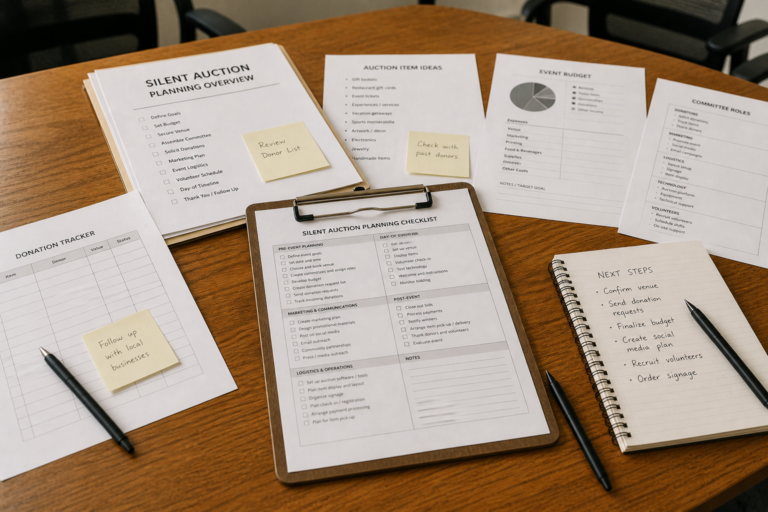
Silent Auction Planning Checklist — Editable
Word Doc · Fully customizable
- Add your event name, date, and organization logo right inside the document
- Remove tasks that don't apply and add your own in seconds
- Share the file with co-chairs or committee members so everyone works from the same version
Silent Auction Planning Checklist Questions, Answered
How far in advance should I start using the planning checklist?
Ideally, you want to open this checklist the moment your event date is confirmed — even if that’s six months out. The pre-event section is designed to cover a long runway, and some tasks (venue booking, sponsorship outreach, donation solicitation) genuinely need that lead time. If you’re starting late, don’t panic — filter the list down to what’s still actionable and focus there first.
Can I use this checklist if I'm running a hybrid auction with both in-person and online bidding?
Yes — the template works well for hybrid events, though you’ll want to use the editable Word version so you can add tasks specific to your online bidding platform (like testing the mobile bidding software, sending registrants a login link, or setting up item catalog photos). The core pre-event, day-of, and post-event structure applies regardless of your bidding format.
Is this checklist appropriate for small events, or is it designed for large galas?
It scales to both. The editable format lets you strip out tasks that don’t apply to a smaller event and keep only what’s relevant. A 50-person school auction might need 20 line items; a 400-person benefit gala might need 80. Start with the full template and cut liberally — it’s much easier to delete tasks than to realize you forgot something important.
What's the best format for sharing this checklist with a volunteer committee?
For most committees, a shared digital file works best as the live working document — either the Word version uploaded to Google Drive or saved in a shared folder everyone can access. Print a copy for each meeting and use it as the agenda. Organizations like the Association of Fundraising Professionals (AFP) recommend clear role assignments and documented timelines as foundational practices for volunteer-led events, and a shared checklist is one of the simplest ways to put those principles into action.
What happens to the checklist after the event is over?
The post-event block is one of the most valuable parts of the template — and the most commonly skipped. After your event, this section should guide your team through winner notification, payment collection follow-up, thank-you letter distribution, and final donor acknowledgment. Save a completed copy of the entire checklist once everything is done. Future committees will thank you for the documented reference point.
Download Your Free Planning Checklist and Stop Running Your Auction from Memory
A well-run silent auction doesn’t happen because the coordinator is exceptionally organized — it happens because the right tasks are documented, assigned, and tracked from the start. This checklist gives your whole committee a shared operating document that keeps everyone accountable without requiring constant check-in meetings. It’s especially valuable when you’re working with volunteers who have limited time and need to know exactly what they own.
Here’s what you get with this template:
Here’s what you get with this template:
- A phased task structure covering pre-event, day-of, and post-event operations
- Dedicated columns for task owner, due date, and real-time status tracking
- A vendor and contact log so nothing lives in anyone’s personal inbox
- A post-event closeout block that ensures donor acknowledgment and payment follow-up don’t fall through the cracks
- An editable Word format so you can tailor every task to your specific event
- A print-ready PDF for kickoff meetings and shared committee spaces
Explore More Silent Auction Resources
A successful silent auction fundraiser requires thoughtful planning, strong partnerships, and an engaging event experience. By understanding how auctions work and what motivates bidders, organizations can create events that raise meaningful support for their mission.
Explore our guides to learn more about:
Step-by-step guides explaining how silent auctions work, how to plan them, and how to run a successful fundraising event.
Explore proven strategies nonprofits use to plan, promote, and maximize fundraising results from silent auction events.
Download templates and tools that help nonprofits organize auction items, track bids, and manage fundraising events.
The Association of Fundraising Professionals offers research, ethical standards, and best practices to help nonprofits improve fundraising success.